- About Ramapo
- Academics
- Admissions & Aid
- Student Life
- Athletics
- Alumni
- Arts & Community
- Quick Links
- Apply
- Visit
- Give
Cybersecurity
Phishing Alert, Protect Your Account (Feb 2. 2026):
Phishing is type of scam where attackers send emails that pretend to be from Ramapo College in order to trick you into giving away personal information, such as your email address and password. These messages are designed to create panic so you’ll act quickly without double-checking.
What We Are Currently Seeing
Many recent phishing emails claim that:
- Your Ramapo account is scheduled for closure
- There is a verification issue with your account
- You must click a link to a “new” portal to verify your identity
- Failure to act immediately will result in loss of access, assessments, or coursework
While the wording may vary, the goal is always the same: They want you to click a link and enter your Ramapo username and password into a fake form.
Important To Know
- Ramapo College IT will never ask you to provide your password for ANY reason.
- Legitimate IT messages will not threaten immediate account closure or loss of academic work.
- Do not assume that a message from a Ramapo email address is authentic.
- Be suspicious of any message that has unusual formatting, such as large text or highlighted sections, or awkward grammar.
As always, if you have any doubt, you can contact the help desk at any time for assistance.
I think I was sent a phishing email. What should I do?
Immediately report the email as Phishing or Spam to Google.
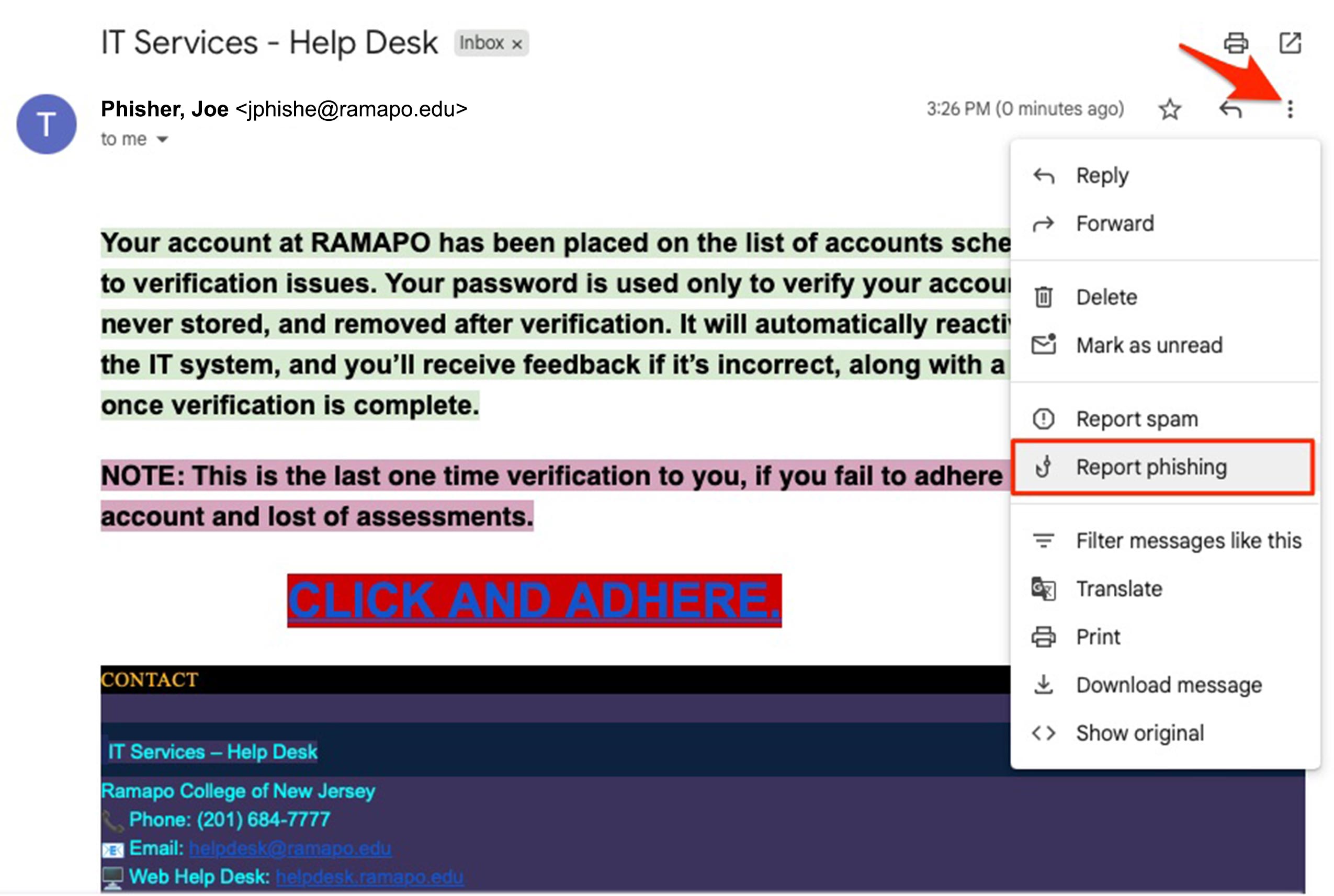
On Desktop: Open the email, click the three-dot menu icon next to the “reply” button, and select Report phishing.
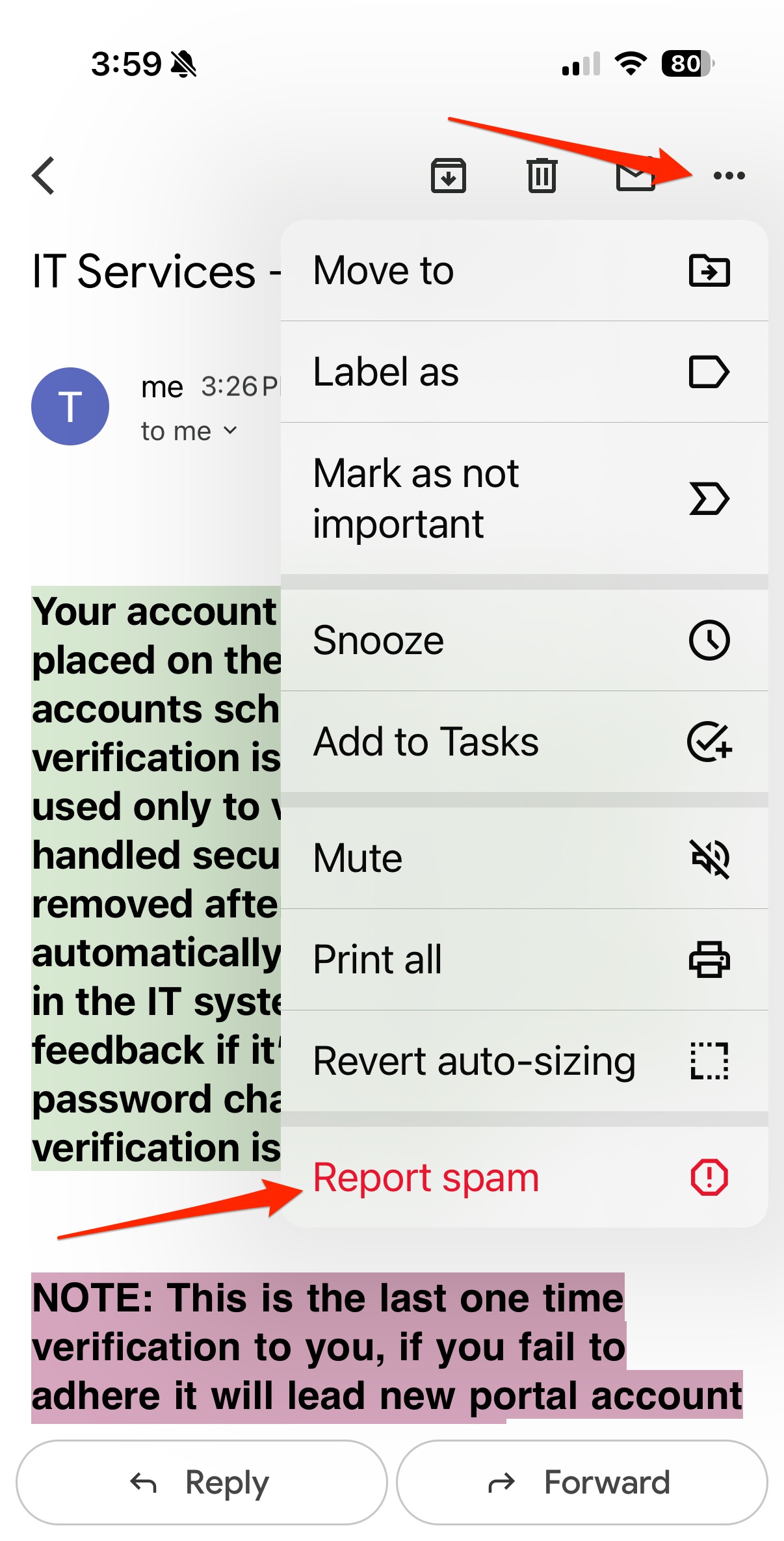
On Mobile: Open the email, tap the three-dot menu icon in the top right corner of the message, and select Report Spam.
I accidentally clicked on a link in a phishing email and submitted my info. What now?
You should immediately change your password. Once your password has been changed, contact the help desk. As a result of the interaction, your email account may have been suspended. You’ll need to reach out to the help desk to reinstate your email account.
Anti-Virus Recommendations
To help protect your personal and academic data, the College strongly recommends having anti-virus software on all personal computers, including both Windows PCs and Macs.
Why anti-virus software is important
- Helps protect against malware and ransomware
- Provides added security when connected to campus or public Wi-Fi
- Supports safe access to academic systems and personal information
Windows computers
Windows includes built-in security tools, including Microsoft Defender. For enhanced protection, Free AVG is recommended. To download and install, click here.
Mac computers
MacOS includes built-in security protections, however Macs are not immune to malware. Installing a reputable anti-virus application can help detect malicious software and unsafe downloads. We recommend Free AVG. To download and install, click here.
Malware, Spyware, Ransomware - What does it all mean?
Malware
Malware is a general term for malicious software designed to damage disrupt, or gain unauthorized access to a computer or data.
Spyware
Malware that secretly collects information about a user or system without the user’s knowledge or consent.
Ransomware
Ransomware is a type of malware that locks or encrypts files and demands payment to restore access.

505 Ramapo Valley Road
Mahwah, NJ 07430
p: 201-684-7500
e: information@ramapo.edu
Copyright ©2026 Ramapo College Of New Jersey. Statements And Policies. Contact Webmaster.