Contact
Public Safety Contact Information
Academic Complex C-Wing, C-102 (ground floor)
p: (201) 684-6666
e: publicsafety@ramapo.edu
Related Resources
Intranet Resources

RCNJ Alerts is Ramapo College’s mass notification system designed to keep you informed, prepared, and safe during emergencies, severe weather, and other critical incidents. Students, faculty, and staff are automatically enrolled in RCNJ Alerts, but verification of your information in the system is quick and easy!
RCNJ Alerts Login for Students, Faculty & Staff
To update emergency contact information: visit the Intranet page: web.ramapo.edu and log in with your Ramapo username and password to verify/edit your contact information. Once you have logged in:
- Click on the box that says “RCNJ Experience / Web Self Service.”
- From the home page, click on the link that says “Open General Dashboard” in the “General Self-Service” box
- Then click on the “Personal Information” box
- Scroll down to the tab that says “Phone Number”
- Click “Add New” in the upper right corner
- Under Select Phone Type, click “RCNJ Alert-” (text and/or voice)
- Input phone number, click “Add”
- Scroll to the “Emergency Contact” tab and click “Add New”
- Input all information for at least one emergency contact
Once you have updated that information, you can verify this information is accurate in the RCNJ Alerts system, by taking these additional steps:
Visit the RCNJ Alerts Login to verify your account information.
- Use your Ramapo College username and password to access the system.
- Verify the information contained in the contact profile.
- If your account is up-to-date, all you need to do is log out of the system by clicking on the grey silhouette in the top right area of the screen. Please note, that while some fields in the RCNJ Alerts system may allow you to add additional contacts, your primary emergency contact information should be updated in RCNJ Experience.
Once you’ve verified, you should be all set to receive emergency alerts from RCNJ Public Safety.
Families and Community Members
Public Safety has opened a Family & Community page to allow members of the extended Roadrunner family to register themselves in the RCNJ Alerts system. This will allow those that register to receive critical communications from Public Safety. To enroll in RCNJ Alerts, please complete the following form. All you need is an active email account and a cell phone number to enroll.
Family and Community RCNJ Alert Sign Up Form
Temporary Visitors and Guests
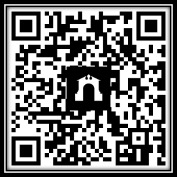
To receive emergency notifications from Ramapo College of New Jersey, you may enroll in RCNJ Alerts by texting:
Join RCNJ-Alerts to 58339
You will receive emergency notifications for 20 hours after joining. After that period, you will automatically stop receiving alerts. For more information, contact RCNJ Public Safety at publicsafety@ramapo.edu.
You may also scan the QR Code below to enroll:
Download the Regroup app for RCNJ Alerts
All members of the RCNJ community are encouraged to download the Regroup mobile app by visiting either the Google Play store for Android devices or the Apple App Store for Apple devices. The download and service are free, and this app lets you use enhanced safety features from RCNJ Alerts, including SecureTrack, TipSafe reporting, and instant Panic Alerts. You will also be able to set personal preferences on how you will receive notifications.
Use network code: rcnjpublicsafety and then “Login Using SSO” with your Ramapo username and password to access our network.
Why download the Regroup app?
- Allows RCNJ Public Safety to communicate directly to users during emergencies;
- Allows users to request emergency assistance instantly with one-click alerts for rapid response times;
- Enables students, faculty, and staff to share real-time feedback and updates using two-way messaging;
- Secure Track feature allows students, faculty and staff to share live location and safety status in real time. The system can automatically detect deviations or missed check-ins to support student and lone-worker safety.


Follow Public Safety